




Some tools look exciting on the first day and then slowly disappear from the daily routine. Google Gemini does not always feel like that. It keeps showing small uses that save time, sometimes in places people never expected. Gmail becomes easier to manage. Google Docs becomes less tiring. Google Sheets stops feeling like a puzzle for basic work.
The interesting part is not replacing people. That idea sounds too dramatic. The practical thing is removing repetitive work. A lot of office employees spend hours writing almost the same email every week. Students keep formatting assignments. Small business owners manually update spreadsheets again and again. Those tiny tasks add up.
Many people search for How Automate Gmail, Google Docs, Sheets & More with Google Gemini because automation sounds difficult at first. Actually, some features need only a simple prompt. No coding. No technical background. Just knowing what to ask.
Sometimes Gemini gives an excellent result. Sometimes the first response feels average and needs another instruction. That is normal. Even experienced users rarely accept the first draft without changing anything. Explore guide by Universal Link Media how we can automate our daily tasks from Google’s Gemini.
Gmail Does Not Need To Be Written From Scratch Every Time
Replying to emails sounds simple until twenty similar messages arrive before lunch. A customer asks for pricing. Another customer asks almost the same question. Someone wants meeting details. Another person requests the same document already shared yesterday. Instead of typing everything again, Gemini can generate replies based on the context inside Gmail. That saves time without making every email sound robotic. For example, a coaching institute receives admission enquiries every day. Rather than writing separate responses repeatedly, Gemini creates a professional draft. Small edits can make every email feel personal. That balance matters. Automation should not remove the human touch completely. People still notice when every email sounds copied.
Simple Prompts Usually Work Better
Many beginners think AI needs complicated instructions. Not really. Something as simple as: “Write a polite follow-up email for a client who has not replied in seven days.” often produces better output than a long confusing paragraph. Another useful prompt could be: “Summarise this email thread into five action points.” That becomes surprisingly useful during busy office days. There is also another habit worth building. Always check names, dates, numbers and attachments before sending. Gemini reduces typing, but verification still belongs to the user.
Google Docs Feels Less Empty
Blank pages are strange. Sometimes writing starts immediately. Sometimes the cursor keeps blinking for fifteen minutes. Gemini helps during those moments by suggesting outlines, improving paragraphs or expanding rough notes into readable content. Imagine a school teacher preparing a circular. Instead of thinking about the first sentence for several minutes, Gemini creates a starting draft. The teacher edits the language, removes unnecessary parts and adds school-specific information. The same happens with business reports. Meeting notes become structured documents. Random bullet points become readable summaries. The result is rarely perfect immediately. But reaching eighty percent in two minutes feels much better than reaching zero percent after twenty minutes.
Editing Is Where Gemini Becomes Surprisingly Helpful
Writing is only one part. Editing usually consumes more time. Grammar corrections are obvious, but Gemini also improves readability. Long paragraphs become shorter. Repeated words disappear. Complex sentences become easier to understand. Sometimes it even suggests headings that were not considered earlier. Still, every suggestion deserves a quick review. There are occasions where the original tone matters more than polished language. A friendly internal message should not suddenly sound like a legal notice. That happens occasionally if every suggestion gets accepted without reading.
Google Sheets Stops Feeling Scary
Many people feel comfortable with documents but become nervous after opening spreadsheets, rows, columns & formulas. Everything starts looking technical. Gemini reduces that fear by explaining formulas in plain language and helping create them faster. Suppose a shop owner tracks monthly sales. Instead of searching online for formulas, a prompt like: “Calculate total sales, average order value and highest monthly revenue.” can provide useful formula suggestions. That saves plenty of searching. Of course, understanding basic spreadsheet concepts still helps. Blindly accepting formulas without checking results is never a good habit.
Everyday Business Tasks Become Faster
A freelancer managing five clients probably notices automation faster than someone sending only one email daily. One client needs invoices. Another requires weekly reports. Someone requests progress updates. Another asks for revised documents. Gemini can assist in preparing these repetitive materials quickly. A digital marketing agency, for example, often prepares campaign summaries every Friday. Instead of creating every report manually, Gemini drafts the summary from available information. The manager only adjusts figures and adds observations. That process feels practical rather than magical. Maybe that is why more professionals are becoming interested in Automate Gmail, Google Docs, Sheets & More with Google Gemini. The attraction is not artificial intelligence itself. The attraction is finishing routine work earlier.
Automation Should Still Have Limits
There is excitement around AI. Sometimes too much excitement. Every task does not need automation. Sensitive financial records deserve careful review. Legal agreements require proper attention. Important client communication should always receive a final human check. Depending completely on AI creates unnecessary mistakes. Using AI as an assistant feels more sensible than treating it like an automatic replacement. That difference is important. Small improvements repeated every day create bigger productivity gains than chasing unrealistic promises. For many professionals, students and business owners, Gemini fits best in those everyday moments that quietly consume time without anyone noticing.
Google Drive Organization Starts Making Sense
Finding one document inside hundreds of files sometimes feels harder than creating the document itself. Random names like “Final_Final_New2” are common. Almost funny. Almost.
Gemini can help generate proper titles, summaries and content that make documents easier to identify later. Teams working on proposals or presentations usually notice this benefit after a few weeks rather than on day one.
A small retail business keeping invoices, supplier notes and product lists inside Google Drive can also save time because related documents become easier to manage. Less searching means more actual work getting finished.
Combining Gmail, Docs and Sheets Is Where Things Become Interesting
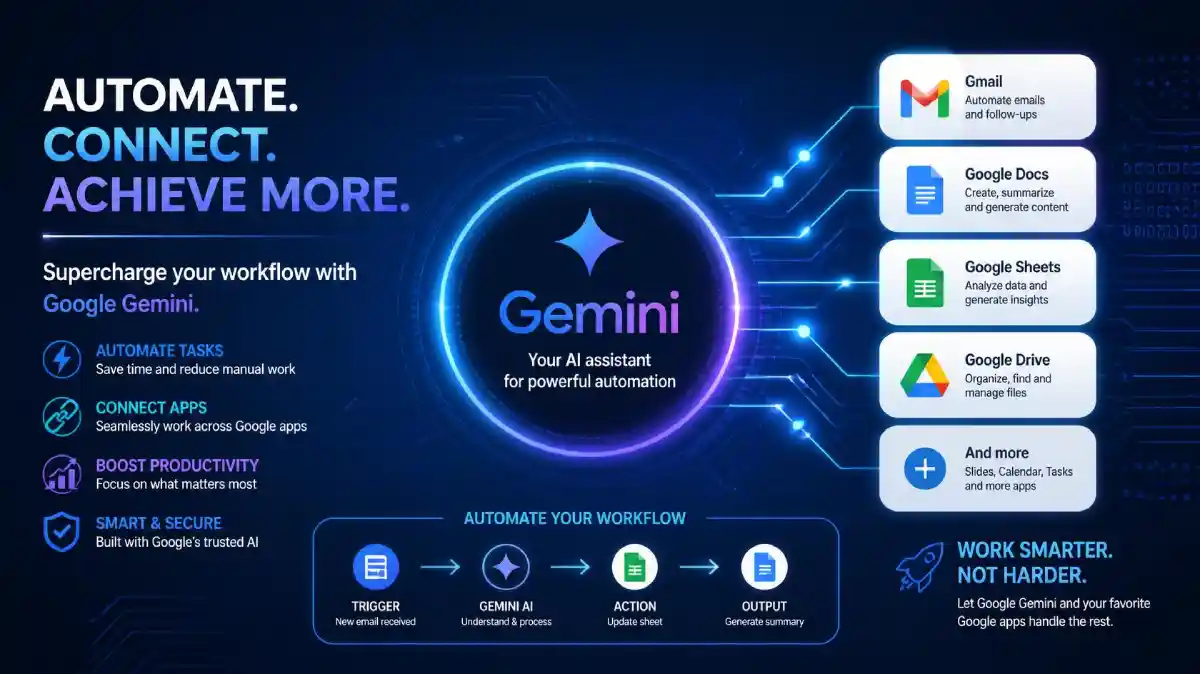
Using only one Google app is useful. Connecting several together feels much smarter. Think about a sales enquiry. The email arrives in Gmail. Important details move into Google Sheets. A quotation gets prepared in Google Docs. Everything happens faster because Gemini assists at every step instead of only one.This does not remove the need for employees. It removes repeated typing. That difference gets ignored in many discussions about AI. Sometimes people expect complete automation. Reality is a little different. The best results usually come when a person guides Gemini instead of expecting perfect work without any review.
Prompt Quality Changes Everything
One short prompt can produce average output. Another slightly clearer prompt can create something genuinely useful. Instead of writing: “Write an email.” Try writing: “Write a friendly email thanking a customer for placing the first order and explain delivery will happen within three working days.”
That extra detail changes the response completely. Many beginners believe better software automatically gives better results. Actually, better instructions often matter more than better software. That sounds obvious after some practice, but not before.
Small Teams Benefit More Than Expected
Large companies already use different automation systems. Small businesses sometimes think AI is only for big organisations. Not really. A local CA office sending appointment reminders. A tuition centre preparing weekly notices. A travel agency answering common holiday questions. A property consultant updating client sheets. These everyday activities become quicker with Gemini support.
Common Mistakes That Slow Everything Down
One mistake is accepting every suggestion immediately. Another is giving almost no context. Both create unnecessary problems. Gemini performs better when names, goals, audience and expected tone are clearly mentioned. Ignoring data privacy is another issue. Internal business information, confidential customer details and sensitive financial records should always be handled according to company policies. AI tools improve productivity, but responsible usage remains important. Some users also expect creativity without providing direction. That rarely works. Good prompts and quick human editing generally produce stronger results than endless regeneration.
Everyday Situations Where Gemini Fits Naturally
A college student preparing project documentation. An HR executive drafting interview invitations. A startup founder organising investor notes. A teacher creating classroom worksheets. A consultant preparing meeting summaries. None of these examples sound revolutionary. That is probably the point. Useful technology quietly becomes part of daily routine instead of demanding constant attention.
Does Every Task Need Automation?
Probably not. Writing birthday wishes personally still feels better. Important negotiations deserve careful wording. Performance reviews should include genuine human judgement.
Automation helps with routine tasks, repetitive formatting and first drafts. Personal conversations still benefit from thoughtful human communication.
Finding that balance is more valuable than automating everything simply because the option exists.
Final Thoughts
People often imagine automation as something complicated involving programming and expensive software. Google Gemini makes many everyday tasks much easier without demanding technical expertise. The biggest advantage is consistency. Emails become faster to prepare. Documents become easier to edit. Spreadsheets become less intimidating. Routine office work becomes more manageable.
Learning How to Automate Gmail, Google Docs, Sheets & More with Google Gemini is less about replacing effort and more about directing effort toward meaningful work. That practical approach is why professionals, students, freelancers and business owners continue exploring Gemini for everyday productivity.
FAQs
Google Gemini can draft replies, summarise conversations and suggest responses based on email context. Every important email should still receive a quick human review before sending because names, dates, attachments and business details always deserve careful verification for accuracy.
Yes. Gemini explains formulas in simple language, suggests spreadsheet functions and helps organise data without requiring advanced spreadsheet knowledge. Beginners still benefit from checking calculations manually until they become comfortable understanding formulas and interpreting spreadsheet results correctly.
Google Gemini assists with drafting, rewriting, summarising and improving document readability. It helps overcome blank-page problems and speeds editing, while users remain responsible for reviewing facts, tone, formatting and any information before sharing completed documents professionally.